WhatsApp CRM & AI Automation Platform
Enterprise CRM/ERP modules with end-to-end WhatsApp Cloud API messaging and an AI chatbot on Azure OpenAI + Azure AI Search.
- Role
- Software Engineer — Angular front-end, ASP.NET Core APIs, integrations
- Timeline
- Nov 2024 – Present
- Organization
- Dial ERP Technology
- Status
- Confidential — screenshots only
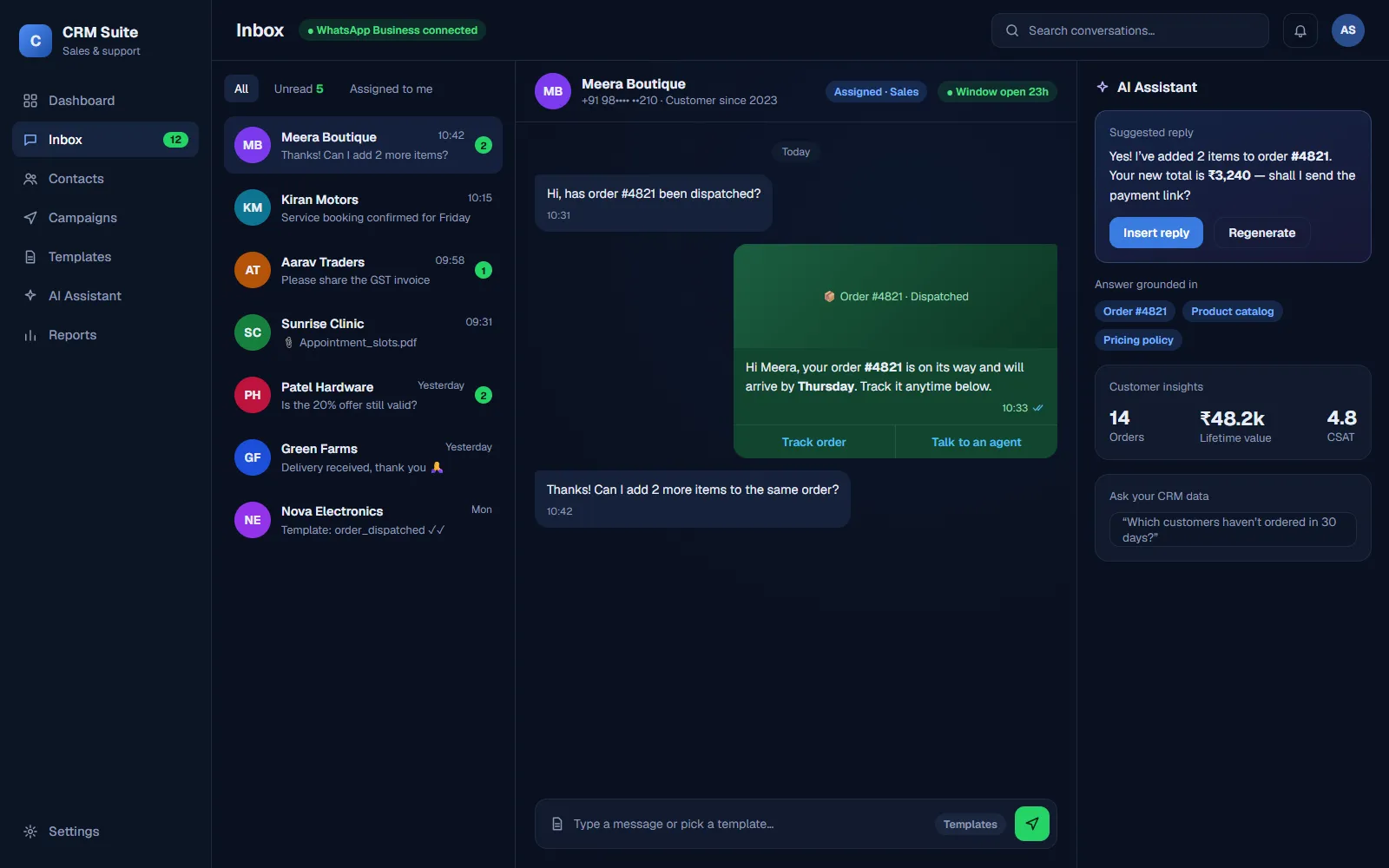
Illustrative UI mockup, not a real screenshot — real screens can be shown in an interview. Built at Dial ERP Technology; no proprietary code or client data shown.
TL;DR
- 40+ REST APIs in ASP.NET Core
- WhatsApp templates, media, webhooks & bulk messaging
- AI chatbot on Azure OpenAI + Azure AI Search (RAG)
- Reusable Angular Material component library
Overview
At Dial ERP Technology I work on an enterprise CRM & ERP platform built with Angular, ASP.NET Core Web API (C#) and MongoDB. Two parts of my work stand out: end-to-end WhatsApp messaging through Meta’s WhatsApp Cloud API, and AI chatbot features powered by Azure OpenAI and Azure AI Search.
My role
- Built CRM & ERP modules across the stack — Angular (Material) front-ends and ASP.NET Core Web APIs on MongoDB.
- Designed and shipped 40+ REST APIs and a set of reusable Angular Material components.
- Integrated the WhatsApp Cloud API: template messages, media, webhooks and bulk messaging.
- Implemented AI chatbot features with Azure OpenAI and Azure AI Search.
- Production support, bug fixing and performance optimization; Agile sprints with code reviews.
What the WhatsApp integration covers
- Template messages — WhatsApp requires pre-approved templates to start a conversation, so the CRM sends approved templates with dynamic values.
- Media — images and documents sent and received inside the CRM.
- Webhooks — Meta calls the API back with delivery and read status and with incoming replies, so agents see conversations update in the CRM.
- Bulk messaging — campaigns to many contacts from one screen.
How the AI assistant answers
The chatbot uses retrieval-augmented generation (RAG): Azure AI Search finds the most relevant company data for a question, and Azure OpenAI writes an answer grounded in those results — so replies are based on the business’s own data instead of guesswork.
Architecture
Tech stack
- Angular
- Angular Material
- TypeScript
- ASP.NET Core Web API
- C#
- MongoDB
- Azure OpenAI
- Azure AI Search
- WhatsApp Cloud API